
Laravel React or Vue configuration
When you are using email builder with Inertia React or Inertia Vue, you can configure email builder via resources/js/configs/email-builder-config.ts file.
Config content
Following is the content of the config file.
// resources/js/configs/email-builder-config.ts
import { AxiosInstance, AxiosRequestHeaders } from "axios";
import { apiClient } from "@/lib/apsonex-utils";
let apiUrl: string;
let csrfToken: string;
interface EmailBuilderProps {
email_builder: {
api_url: string;
csrf_token: string;
domain: string;
};
record?: {
index_url?: string;
create_url?: string;
edit_url?: string;
email_template?: string;
};
redirect_on_create?: string;
}
export default function useEmailTemplateConfig({ props }: { props: EmailBuilderProps }) {
apiUrl = props.email_builder.api_url;
csrfToken = props.email_builder.csrf_token;
const client: AxiosInstance = apiClient({
apiUrl: apiUrl,
csrfToken: csrfToken,
acceptJson: true,
});
function config() {
return {
// Logo for desktop and mobile screen
// logo: {
// lg: 'https://example.com/logo.png',
// sm: 'https://example.com/icon.png',
// },
// Use fake response for testing. It will not query AI apiUrl.
fake: false,
// Enable debugging. It will print console log
debug: false,
domain: props.email_builder.domain,
// Some of the data can be cached.
// Enable cache. Use s -> seconds, h -> hours, d -> days, m -> months for ttl
// Note: cache should be enable in production only
cache: {
enable: false,
ttl: '24h',
},
initializeConfig: {
// initializeConfig.index will load the initial config required for frontend
// res.data.config object contains placeholders information, media configuration, and other data
// Visit `Apsonex\EmailBuilderLaravel\Controllers\InitializeController` at `invoke method`
index: async ({ queryString }: { queryString?: string }): Promise<any> => {
const res = await client.get(
"/initialize-config" + (queryString ? `?${queryString}` : "")
);
return res.data;
},
},
// Provide information about the CRUD routes
record: {
indexUrl: props.record?.index_url,
createUrl: props.record?.create_url,
editUrl: props.record?.edit_url,
emailTemplate: props.record?.email_template,
},
// Actions config
actions: {
goBack: {
// `goBack.action` callback will run when user click back button.
action: async (): Promise<void> => {
if (props.record?.index_url) {
window.location.href = props.record.index_url;
}
},
},
onBroadcastAction: {
/**
* `onBroadcastAction.action` will trigger, when user is ready to publish the email template
*
* Use `onBroadcastAction.previewType` to store preview image.
* Use `onBroadcastAction.btnLabel` to Customize the text of Button Label.
*
*/
previewType: 'webp',
/**
* Button Label
*/
btnLabel: 'Broadcast',
/**
* Use this call back to save image preview, and html and send user to campaign management page,
* where user can customize campaign criteria to publish.
*/
action: async ({
emailTemplateId,
subject,
html,
emailConfig,
image,
imageMime,
}: {
emailTemplateId: string;
subject: string;
html: string;
emailConfig: string;
image: string;
imageMime: string;
}): Promise<any> => {
console.log(emailTemplateId); // Email ID
console.log(subject); // Email subject
console.log(html); // Email HTML
console.log(image); // base64 encoded image preview. data:<mime>;base64,UklGRrALAAB...
console.log(imageMime); // <mime> e.g. image/webp
},
},
onPrepareToSaveAction: {
/**
* `onPrepareToSave.action` will trigger, when user is ready to save the email template with html
*
* Use `onPrepareToSave.previewType` to store preview image.
* Use `onPrepareToSave.btnLabel` to Customize the text of Button Label.
*
*/
previewType: 'webp',
/**
* Button Label
*/
btnLabel: 'Prepare To Send',
/**
* Use this call back to save image preview, and html for later use.
* This action is useful when you do not want to broadcast it and
* use the generated HTML with automation system for later user
*/
action: async ({
emailTemplateId,
subject,
html,
emailConfig,
image,
imageMime,
}: {
emailTemplateId: string;
subject: string;
html: string;
emailConfig: string;
image: string;
imageMime: string;
}): Promise<any> => {
const payload = { emailTemplateId, subject, emailConfig, html, image };
try {
const res = await client.put(`email-templates/${emailTemplateId}`, payload);
return {
...res.data,
redirectUrl: res.data.redirect_url || props.record?.index_url
};
} catch (err) {
return {};
}
},
},
onQuickSendAction: {
/**
* `onQuickSendAction.action` will is useful, when you want to send direct email without broadcasting or creating campaign
*/
action: async ({ html, subject }: { html: string; subject: string }): Promise<void> => {
//
},
},
},
assets: {
/**
* `assets.font` provide api to interact with fonts
*/
font: {
index: async ({
perPage,
page,
query,
}: {
perPage: number;
page: number;
query?: string;
}): Promise<{ fonts: any[] }> => {
const res = await client.get(`fonts?perPage=${perPage}&page=${page}&query=${query}`);
return {
fonts: res && res.data && res.data.status === 'success' ? res.data.data : [],
};
},
},
},
prebuilt: {
/**
* Prebuilt Subjects
*/
subjects: {
industries: {
/**
* Enable multi industry selection
*/
multi: false,
// Show available list of industries for subjects
index: async (): Promise<any> => {
try {
const res = await client.get(`/prebuilt/subjects/industries`);
return res.data;
} catch (error) {
return {};
}
},
// If industry is chosen, get subjects available under that industry
show: async ({ industry }: { industry: string }): Promise<any> => {
try {
const res = await client.get(`/prebuilt/subjects/industries/${industry}`);
if (res && res.data.status === 'success') return res.data;
return null;
} catch (error) {
return [];
}
},
},
},
blocks: {
categories: {
// List of block categories. e.g. Hero, Newsletter, Footer etc.
index: async (): Promise<any> => {
try {
const res = await client.get(`/prebuilt/blocks/categories`);
return res.data;
} catch (error) {
console.log(error);
return [];
}
},
// Get prebuilt blocks under specified category. E.g. get blocks available under `hero` category
show: async ({ category }: { category: string }): Promise<any> => {
try {
const res = await client.get(`/prebuilt/blocks/categories/${category}`);
return res.data;
} catch (error) {
return [];
}
},
},
},
emails: {
industries: {
// Show available list of industries for email configs
index: async () => {
const res = await client.get(`/prebuilt/emails/industries`);
return res.data;
},
// Get list of available email types in specified industry
emailTypes: async ({ industry }: { industry: string }): Promise<any> => {
const res = await client.get(`/prebuilt/emails/industries/${industry}/email-types`);
return res.data;
},
// Get email configs in specified industry & type
configs: async ({
industry,
type,
}: {
industry: string;
type: string;
}): Promise<any> => {
const res = await client.get(`/prebuilt/emails/industries/${industry}/email-types/${type}`);
return res.data;
},
},
},
},
ai: {
subjects: {
create: {
url: `${apiUrl}/ai/subjects`,
onBeforeRequest: ({
headers,
body,
}: {
headers: AxiosRequestHeaders;
body: any;
}) => {
// Modify headers or body before request
return { headers: addValidHeaders(headers), body };
},
},
},
blocks: {
create: {
url: `${apiUrl}/ai/blocks`,
onBeforeRequest: ({
headers,
body,
}: {
headers: AxiosRequestHeaders;
body: any;
}) => {
// Modify headers or body before request
return { headers: addValidHeaders(headers), body };
},
},
},
emails: {
create: {
url: `${apiUrl}/ai/emails`,
onBeforeRequest: ({
headers,
body,
}: {
headers: AxiosRequestHeaders;
body: any;
}) => {
// Modify headers or body before request
return { headers: addValidHeaders(headers), body };
},
},
},
},
blockTemplates: {
index: async ({ queryString }: { queryString?: string }): Promise<any> => {
try {
const res = await client.get(`/block-templates?` + queryString);
return res.data;
} catch (err) {
return [];
}
},
show: async ({ id }: { id: string }): Promise<any> => {
try {
const res = await client.get(`/block-templates/${id}`);
return res.data;
} catch (err) {
return [];
}
},
store: async ({
label,
category,
image,
type,
config,
}: {
label: string;
category: string;
image: string;
type: string;
config: any;
}): Promise<any> => {
try {
const res = await client.post(`block-templates`, { label, category, image, type, config });
return res.data;
} catch (err) {
console.log(err);
return [];
}
},
update: async ({
id,
label,
category,
image,
}: {
id: string;
label: string;
category: string;
image: string;
}): Promise<any> => {
try {
const res = await client.put(`block-templates/${id}`, { label, category, image });
return res.data;
} catch (err) {
return [];
}
},
destroy: async ({ id }: { id: string }): Promise<any> => {
try {
const res = await client.delete(`block-templates/${id}`);
return res.data;
} catch (err) {
console.log(err);
return [];
}
},
},
emailTemplates: {
show: async ({ id }: { id: string }): Promise<any> => {
try {
const res = await client.get(`email-templates/${id}`);
return res.data;
} catch (err) {
console.log(err);
return [];
}
},
store: async ({
subject,
emailConfig,
}: {
subject: string;
emailConfig: any;
}): Promise<any> => {
try {
const res = await client.post(`email-templates`, { subject, emailConfig });
return res.data;
} catch (err) {
return [];
}
},
update: async ({
id,
subject,
emailConfig,
}: {
id: string;
subject: string;
emailConfig: any;
}): Promise<any> => {
try {
const res = await client.put(`email-templates/${id}`, { id, subject, emailConfig });
return res.data;
} catch (err) {
return [];
}
},
destroy: async ({ id }: { id: string }): Promise<any> => {
try {
const res = await client.delete(`email-templates/${id}`);
return res.data;
} catch (err) {
return [];
}
},
},
media: {
index: async ({ queryString }: { queryString?: string }): Promise<any> => {
try {
const res = await client.get(`media?` + queryString);
return res.data;
} catch (_) {
return [];
}
},
store: async ({ formData }: { formData: FormData }): Promise<any> => {
try {
const res = await client.post(`media`, formData, {
headers: addValidHeaders({
'Content-Type': 'multipart/form-data',
}),
});
return res.data;
} catch (error) {
return [];
}
},
destroy: async ({ id }: { id: string }): Promise<any> => {
try {
const res = await client.delete(`media/${id}`);
return res.data;
} catch (error) {
return [];
}
},
},
events: {
listeners: {
ai: {
onSubjectCreated: (_: {
finishReason: string;
completionTokens: number;
promptTokens: number;
totalTokens: number;
}): void => {
// Callback will trigger once Email Template created with AI
},
onBlockCreated: (_: {
finishReason: string;
completionTokens: number;
promptTokens: number;
totalTokens: number;
}): void => {
// Callback will trigger once Block created with AI
},
onEmailCreated: (_: {
finishReason: string;
completionTokens: number;
promptTokens: number;
totalTokens: number;
}): void => {
// Callback will trigger once Subject created with AI
},
},
},
},
};
}
return {
config,
};
}
function addValidHeaders(headers: Record<string, string> = {}): Record<string, string> {
return {
...headers,
Accept: "application/json",
...(csrfToken ? { "x-csrf-token": csrfToken } : {}),
};
}Email Builder Service Provider
The EmailBuilderServiceProvider injects environment-specific configuration data into Inertia.js pages. In the boot() method, it uses \Inertia\Inertia::share() to provide a shared email_builder object that contains values the frontend can access. Specifically, it sets a dynamic domain value, using a fixed external URL when running locally and falling back to the application URL in other environments. It also provides the api_url value from the email-builder-laravel configuration file, ensuring the frontend knows which API endpoint to communicate with. Additionally, it shares the current CSRF token so frontend requests can be securely authenticated without extra setup. This approach centralizes environment configuration, making it easy to maintain and keeping the frontend and backend in sync.
<?php
namespace App\Providers;

{...}

class EmailBuilderServiceProvider extends ServiceProvider
{
    {...}
    public function boot(): void
    {
        \Inertia\Inertia::share('email_builder', function (Request $request) {
            return [
                'domain'     => config('app.url'),
                'api_url'    => config('email-builder-laravel.api_url'),
                'csrf_token' => csrf_token(),
            ];
        });
    }
}
Replace Logo
You can replace default logo with your own logo. In EmailBuilderServiceProvider, add logo config as follows. You can use Laravel url helper method or you can also use asset helper method
<?php
{...}

class EmailBuilderServiceProvider extends ServiceProvider
{
    {...}
    public function boot(): void
    {
        \Inertia\Inertia::share('email_builder', function (Request $request) {
            return [
                {...},
                'logo' => [
                    'sm' => url('assets/icon.png'), // http://<your-domain>/assets/icon.png
                    'lg' => url('assets/logo-dark.png'), // http://<your-domain>/assets/icon.png
                ],
            ];
        });
    }
}
Use logo.sm & logo.lg config in frontend. Open resources/js/configs/email-builder-config.ts file
export default function useEmailTemplateConfig({ props }: { props: EmailBuilderProps }) {

    function config() {
        return {
            // logo: {
            //     lg: 'https://example.com/logo.png',
            //     sm: 'https://example.com/icon.png',
            // },
            logo: {
                lg: props.email_builder.logo.lg,
                sm: props.email_builder.logo.sm,
            },
        };
    }

    return {
        config,
    };
}
Broadcast Email
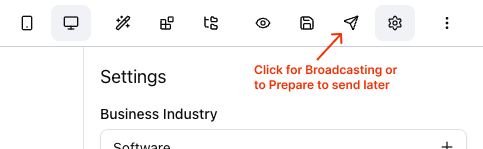
User can broadcast email template or prepare to send later. Simple click Prepare-To-Send btn located inside top right corner menu as shown in image below.
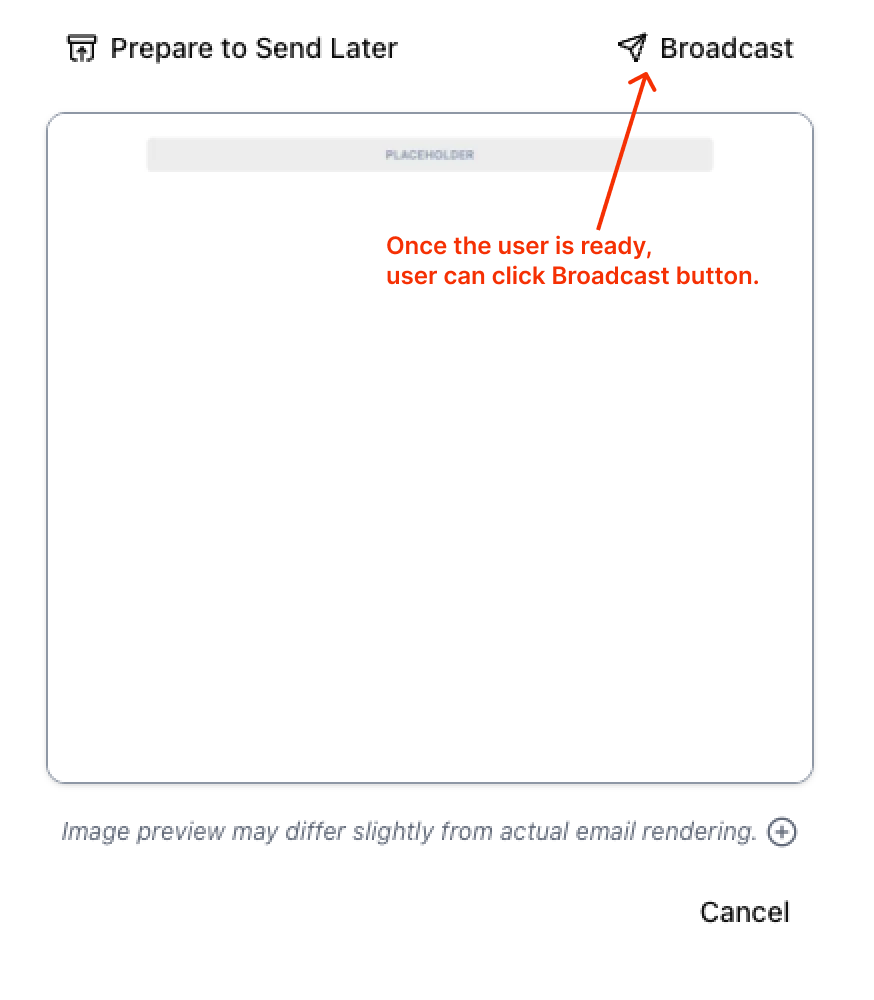
Once user is ready, user can click broadcast button and it will trigger actions.onBroadcastAction.action method and provide emailTemplateId, subject, html, emailConfig, image, imageMime parameters. You can further direct user the broadcast configuration page, where user can select Email Receivables, and filter them as required.
Automate Email Broadcasting
There may be a time when you create a functionality to use email template for automation. Automation need email html. Once email template is ready to be used, User need to save html by clicking Prepare to Send Later button.
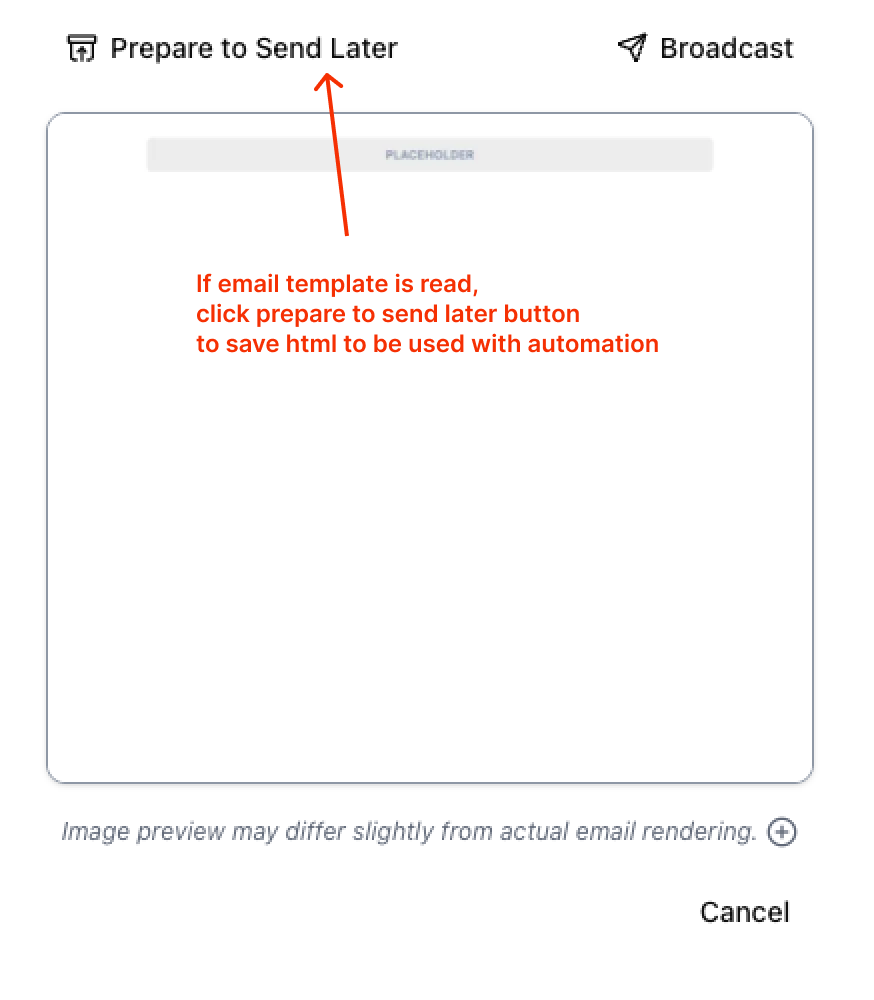
actions.onPrepareToSaveAction.action will save the template html and mark it ready to be used. Then you can use this email for automation.
SUGGESTION
You can use Automation Builder for automation tasks. It plays nicely with email builder.
Token Usage
You can track token usage via following config methods inside config object:
events.listeners.ai.onSubjectCreated: Trigger when subject is createdevents.listeners.ai.onBlockCreated: Trigger when email block is createdevents.listeners.ai.onEmailCreated: Trigger when email template is created
{
    ...,
    events: {
        listeners: {
            ai: {
                onSubjectCreated: (_: {
                    finishReason: string;
                    completionTokens: number;
                    promptTokens: number;
                    totalTokens: number;
                }): void => {
                    // Callback will trigger once Email Template created with AI
                },
                onBlockCreated: (_: {
                    finishReason: string;
                    completionTokens: number;
                    promptTokens: number;
                    totalTokens: number;
                }): void => {
                    // Callback will trigger once Block created with AI
                },
                onEmailCreated: (_: {
                    finishReason: string;
                    completionTokens: number;
                    promptTokens: number;
                    totalTokens: number;
                }): void => {
                    // Callback will trigger once Subject created with AI
                },
            },
        },
    },
}